

Motorola WAVE PTX Dispatch Console - Cloud-Based Voice, Video & Location Dispatch
Contact Us For a Quote
Motorola WAVE PTX Dispatch Console - Cloud-Based Voice, Video & Location Dispatch is backordered and will ship as soon as it is back in stock.
Motorola WAVE PTX Dispatch Console - Cloud-Based Voice, Video & Location Dispatch
Browser-Based PTT • Live Mapping • Up to 20 Talkgroups • AES-256 • License-Free
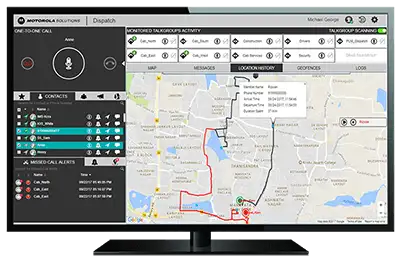
The Motorola WAVE PTX Dispatch Console is a secure, browser-based push-to-talk and real-time location dispatch platform that puts voice dispatch, live mapping, and multimedia messaging on one centralized dashboard. There is no hardware to rack, just Windows and Chrome. It commands your entire fleet of WAVE PTX / TLK radios, such as the Motorola TLK100 and Motorola TLK110, from a single screen so dispatchers, field teams, and supervisors stay coordinated.
Who It's For
Operations that run a fleet of nationwide push-to-talk radios and need a control center for voice, location, and media in one window. Already running WAVE PTX devices? The Dispatch Console unifies them, explore the full lineup of WAVE PTX / TLK radios or read the Motorola WAVE PTX overview to see how the platform fits your team.
Key Features
Push-to-Talk Voice Dispatch
Place one-to-one, group, and broadcast calls, and monitor up to 20 talkgroups with scanning, logging, and override, full command of every conversation from the console.
Live Mapping & Tracking
Real-time location with geofencing, replay history, and in-map messaging keeps dispatchers ahead of every field movement.
Multimedia Messaging
Share photos, videos, audio, documents, and text inside organized chat threads so the field and the desk stay on the same page.
Dynamic Role Management
Assign and adjust user roles on the fly from one centralized dashboard, scale coverage up or down without touching a single device.
Optional Streaming Video
Pull live video from the field for richer situational awareness during incidents, inspections, and high-stakes operations.
Enterprise-Grade Security
AES-256 encryption plus remote management protect every channel and device across your WAVE PTX fleet.
No Hardware to Rack
Runs entirely in Google Chrome on Windows 10 or later, deploy a full dispatch center on existing PCs with nothing to install or maintain on-site.
Technical Specifications
| Feature | Specification |
|---|---|
| Platform | Cloud / browser-based dispatch console (software) |
| Operating System | Windows 10 or later |
| Browser Requirement | Google Chrome |
| Voice Dispatch | One-to-one, group & broadcast push-to-talk calls |
| Talkgroup Monitoring | Up to 20 talkgroups with scanning, logging & override |
| Location Services | Live mapping, geofencing, replay history & in-map messaging |
| Messaging | Photos, videos, audio, documents & text in chat threads |
| Video | Optional live streaming video from the field |
| User Management | Dynamic role assignment from a centralized dashboard |
| Encryption | AES-256 |
| Management | Remote device management |
| Compatible Radios | WAVE PTX / TLK radios (e.g. Motorola TLK100, TLK110) |
| License Required | No (license-free) |
Who Is the WAVE PTX Dispatch Console For?
The Motorola WAVE PTX Dispatch Console is built for dispatchers, field teams, and supervisors who need a single command center for voice, location, and media, logistics and delivery fleets tracking drivers in real time, security and facilities teams coordinating across large sites, and any operation running nationwide push-to-talk radios. It pairs naturally with the Motorola TLK100 and Motorola TLK110. Browse the full range of WAVE PTX / TLK radios, compare other business two-way radios, or read the Motorola WAVE PTX overview to plan your rollout.
Frequently Asked Questions About the Motorola WAVE PTX Dispatch Console - Cloud-Based Voice, Video & Location Dispatch
• Does the Motorola WAVE PTX Dispatch Console require an FCC license?
No. The WAVE PTX Dispatch Console is cloud, browser-based software that runs over your existing data connection, and the WAVE PTX / TLK radios it commands operate on a nationwide LTE network, so no FCC license is required. Questions on setup? Call 1-800-984-1534 or contact our radio experts.
• What do I need to run the WAVE PTX Dispatch Console?
The Motorola WAVE PTX Dispatch Console runs in Google Chrome on a PC with Windows 10 or later, there is no hardware to rack and nothing to install on-site. You manage voice, mapping, and messaging entirely from the browser dashboard.
• Which radios work with the WAVE PTX Dispatch Console?
The console commands your full fleet of WAVE PTX / TLK radios from one screen, including the Motorola TLK100 and Motorola TLK110. See the complete lineup of WAVE PTX / TLK radios.
• How many talkgroups can the WAVE PTX Dispatch Console monitor?
The Motorola WAVE PTX Dispatch Console lets dispatchers monitor up to 20 talkgroups at once with scanning, logging, and override, plus one-to-one, group, and broadcast push-to-talk calling from a single dashboard.
• Is the WAVE PTX Dispatch Console secure?
Yes. The WAVE PTX Dispatch Console uses AES-256 encryption together with remote device management to protect every channel and device across your fleet, making it suitable for security-conscious operations.
Motorola WAVE PTX Dispatch Console - Cloud-Based Voice, Video &...
Motorola WAVE PTX Dispatch Console - Cloud-Based Voice, Video & Location Dispatch
Browser-Based PTT • Live Mapping • Up to 20 Talkgroups • AES-256 • License-Free
The Motorola WAVE PTX Dispatch Console is a secure, browser-based push-to-talk and real-time location dispatch platform that puts voice dispatch, live mapping, and multimedia messaging on one centralized dashboard. There is no hardware to rack, just Windows and Chrome. It commands your entire fleet of WAVE PTX / TLK radios, such as the Motorola TLK100 and Motorola TLK110, from a single screen so dispatchers, field teams, and supervisors stay coordinated.
Who It's For
Operations that run a fleet of nationwide push-to-talk radios and need a control center for voice, location, and media in one window. Already running WAVE PTX devices? The Dispatch Console unifies them, explore the full lineup of WAVE PTX / TLK radios or read the Motorola WAVE PTX overview to see how the platform fits your team.
Key Features
Push-to-Talk Voice Dispatch
Place one-to-one, group, and broadcast calls, and monitor up to 20 talkgroups with scanning, logging, and override, full command of every conversation from the console.
Live Mapping & Tracking
Real-time location with geofencing, replay history, and in-map messaging keeps dispatchers ahead of every field movement.
Multimedia Messaging
Share photos, videos, audio, documents, and text inside organized chat threads so the field and the desk stay on the same page.
Dynamic Role Management
Assign and adjust user roles on the fly from one centralized dashboard, scale coverage up or down without touching a single device.
Optional Streaming Video
Pull live video from the field for richer situational awareness during incidents, inspections, and high-stakes operations.
Enterprise-Grade Security
AES-256 encryption plus remote management protect every channel and device across your WAVE PTX fleet.
No Hardware to Rack
Runs entirely in Google Chrome on Windows 10 or later, deploy a full dispatch center on existing PCs with nothing to install or maintain on-site.
Who Is the WAVE PTX Dispatch Console For?
The Motorola WAVE PTX Dispatch Console is built for dispatchers, field teams, and supervisors who need a single command center for voice, location, and media, logistics and delivery fleets tracking drivers in real time, security and facilities teams coordinating across large sites, and any operation running nationwide push-to-talk radios. It pairs naturally with the Motorola TLK100 and Motorola TLK110. Browse the full range of WAVE PTX / TLK radios, compare other business two-way radios, or read the Motorola WAVE PTX overview to plan your rollout.
Frequently Asked Questions About the Motorola WAVE PTX Dispatch Console - Cloud-Based Voice, Video & Location Dispatch
• Does the Motorola WAVE PTX Dispatch Console require an FCC license?
No. The WAVE PTX Dispatch Console is cloud, browser-based software that runs over your existing data connection, and the WAVE PTX / TLK radios it commands operate on a nationwide LTE network, so no FCC license is required. Questions on setup? Call 1-800-984-1534 or contact our radio experts.
• What do I need to run the WAVE PTX Dispatch Console?
The Motorola WAVE PTX Dispatch Console runs in Google Chrome on a PC with Windows 10 or later, there is no hardware to rack and nothing to install on-site. You manage voice, mapping, and messaging entirely from the browser dashboard.
• Which radios work with the WAVE PTX Dispatch Console?
The console commands your full fleet of WAVE PTX / TLK radios from one screen, including the Motorola TLK100 and Motorola TLK110. See the complete lineup of WAVE PTX / TLK radios.
• How many talkgroups can the WAVE PTX Dispatch Console monitor?
The Motorola WAVE PTX Dispatch Console lets dispatchers monitor up to 20 talkgroups at once with scanning, logging, and override, plus one-to-one, group, and broadcast push-to-talk calling from a single dashboard.
• Is the WAVE PTX Dispatch Console secure?
Yes. The WAVE PTX Dispatch Console uses AES-256 encryption together with remote device management to protect every channel and device across your fleet, making it suitable for security-conscious operations.
Motorola WAVE PTX Dispatch Console - Cloud-Based Voice, Video & Location Dispatch
Motorola WAVE PTX Dispatch Console - Cloud-Based Voice, Video & Location Dispatch
Browser-Based PTT • Live Mapping • Up to 20 Talkgroups • AES-256 • License-Free
The Motorola WAVE PTX Dispatch Console is a secure, browser-based push-to-talk and real-time location dispatch platform that puts voice dispatch, live mapping, and multimedia messaging on one centralized dashboard. There is no hardware to rack, just Windows and Chrome. It commands your entire fleet of WAVE PTX / TLK radios, such as the Motorola TLK100 and Motorola TLK110, from a single screen so dispatchers, field teams, and supervisors stay coordinated.
Who It's For
Operations that run a fleet of nationwide push-to-talk radios and need a control center for voice, location, and media in one window. Already running WAVE PTX devices? The Dispatch Console unifies them, explore the full lineup of WAVE PTX / TLK radios or read the Motorola WAVE PTX overview to see how the platform fits your team.
Key Features
Push-to-Talk Voice Dispatch
Place one-to-one, group, and broadcast calls, and monitor up to 20 talkgroups with scanning, logging, and override, full command of every conversation from the console.
Live Mapping & Tracking
Real-time location with geofencing, replay history, and in-map messaging keeps dispatchers ahead of every field movement.
Multimedia Messaging
Share photos, videos, audio, documents, and text inside organized chat threads so the field and the desk stay on the same page.
Dynamic Role Management
Assign and adjust user roles on the fly from one centralized dashboard, scale coverage up or down without touching a single device.
Optional Streaming Video
Pull live video from the field for richer situational awareness during incidents, inspections, and high-stakes operations.
Enterprise-Grade Security
AES-256 encryption plus remote management protect every channel and device across your WAVE PTX fleet.
No Hardware to Rack
Runs entirely in Google Chrome on Windows 10 or later, deploy a full dispatch center on existing PCs with nothing to install or maintain on-site.
Technical Specifications
| Feature | Specification |
|---|---|
| Platform | Cloud / browser-based dispatch console (software) |
| Operating System | Windows 10 or later |
| Browser Requirement | Google Chrome |
| Voice Dispatch | One-to-one, group & broadcast push-to-talk calls |
| Talkgroup Monitoring | Up to 20 talkgroups with scanning, logging & override |
| Location Services | Live mapping, geofencing, replay history & in-map messaging |
| Messaging | Photos, videos, audio, documents & text in chat threads |
| Video | Optional live streaming video from the field |
| User Management | Dynamic role assignment from a centralized dashboard |
| Encryption | AES-256 |
| Management | Remote device management |
| Compatible Radios | WAVE PTX / TLK radios (e.g. Motorola TLK100, TLK110) |
| License Required | No (license-free) |
Who Is the WAVE PTX Dispatch Console For?
The Motorola WAVE PTX Dispatch Console is built for dispatchers, field teams, and supervisors who need a single command center for voice, location, and media, logistics and delivery fleets tracking drivers in real time, security and facilities teams coordinating across large sites, and any operation running nationwide push-to-talk radios. It pairs naturally with the Motorola TLK100 and Motorola TLK110. Browse the full range of WAVE PTX / TLK radios, compare other business two-way radios, or read the Motorola WAVE PTX overview to plan your rollout.
Frequently Asked Questions About the Motorola WAVE PTX Dispatch Console - Cloud-Based Voice, Video & Location Dispatch
• Does the Motorola WAVE PTX Dispatch Console require an FCC license?
No. The WAVE PTX Dispatch Console is cloud, browser-based software that runs over your existing data connection, and the WAVE PTX / TLK radios it commands operate on a nationwide LTE network, so no FCC license is required. Questions on setup? Call 1-800-984-1534 or contact our radio experts.
• What do I need to run the WAVE PTX Dispatch Console?
The Motorola WAVE PTX Dispatch Console runs in Google Chrome on a PC with Windows 10 or later, there is no hardware to rack and nothing to install on-site. You manage voice, mapping, and messaging entirely from the browser dashboard.
• Which radios work with the WAVE PTX Dispatch Console?
The console commands your full fleet of WAVE PTX / TLK radios from one screen, including the Motorola TLK100 and Motorola TLK110. See the complete lineup of WAVE PTX / TLK radios.
• How many talkgroups can the WAVE PTX Dispatch Console monitor?
The Motorola WAVE PTX Dispatch Console lets dispatchers monitor up to 20 talkgroups at once with scanning, logging, and override, plus one-to-one, group, and broadcast push-to-talk calling from a single dashboard.
• Is the WAVE PTX Dispatch Console secure?
Yes. The WAVE PTX Dispatch Console uses AES-256 encryption together with remote device management to protect every channel and device across your fleet, making it suitable for security-conscious operations.
Contact Us For a Quote
1-800-984-1534